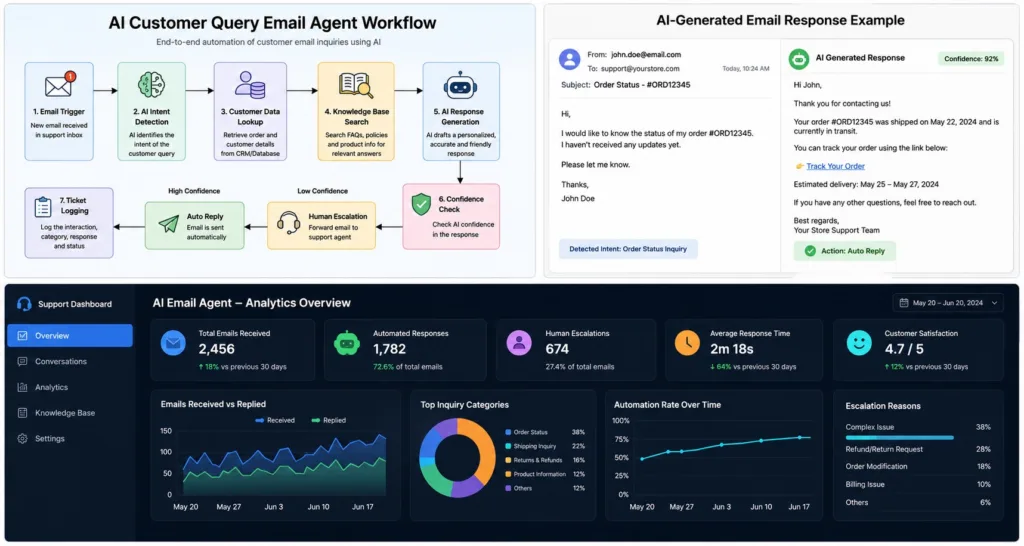
Case Study: AI-Powered Customer Query Email Agent Workflow
Overview
A growing eCommerce business was struggling to manage hundreds of customer emails daily. Common inquiries about order status, product availability, shipping, returns, and sizing required manual responses, leading to delayed replies and increased support costs.
An AI-powered Customer Query Email Agent was implemented using n8n, AI language models, and email automation to streamline customer support while maintaining a personalized experience.
The Challenge
The business faced several operational issues:
200+ customer emails received every day
Slow response times during weekends and holidays
Repetitive questions consuming support staff time
Inconsistent replies from different support agents
Customers abandoning purchases due to delayed responses
Manual sorting of emails before assigning them to staff
As order volume increased, hiring additional support agents would significantly increase operating expenses.
The Solution
An intelligent AI Email Agent was designed to automatically receive, understand, categorize, and respond to customer inquiries.
The workflow combines AI reasoning with business rules to provide accurate and human-like support while escalating complex cases when necessary.
Workflow Architecture
Step 1: Email Trigger
The workflow monitors the support inbox continuously.
Whenever a new email arrives, it automatically starts the automation.
Step 2: AI Intent Detection
The AI analyzes the email content and identifies customer intent, such as:
Order status
Shipping inquiry
Product availability
Size recommendation
Return request
Refund request
Restock inquiry
General information
This removes the need for manual ticket sorting.
Step 3: Customer Data Lookup
If the customer provides an order number or email address, the workflow retrieves relevant information from the order database or CRM.
The AI receives real-time context before generating a response.
Step 4: Knowledge Base Search
The agent searches internal documentation, FAQs, shipping policies, return policies, and product information.
Responses are generated based only on approved business information.
This minimizes inaccurate or hallucinated answers.
Step 5: AI Response Generation
Using the retrieved information, the AI drafts a professional, friendly, and personalized email.
The response matches the customer’s language and tone while maintaining brand consistency.
Example:
“Thank you for contacting us. Your order has been shipped and is currently in transit. Based on the latest tracking update, delivery is expected within 2–3 business days.”
Step 6: Confidence Check
If AI confidence is high:
The email is automatically sent.
If confidence is low:
The conversation is forwarded to a human support agent.
This hybrid approach ensures quality while maximizing automation.
Step 7: Ticket Logging
Every interaction is stored automatically in the support database.
The workflow records:
Customer email
Inquiry category
AI response
Resolution status
Timestamp
This creates a searchable history for future support and reporting.
Step 8: Analytics Dashboard
Management gains visibility into:
Total emails handled
Automation rate
Average response time
Most common customer questions
Human escalation rate
Customer satisfaction trends
These insights help optimize support operations over time.
Technology Stack
n8n for workflow automation
AI Language Model for natural language understanding
Gmail/IMAP for email integration
CRM or database for customer lookup
Internal knowledge base and FAQs
Google Sheets or database for logging
Slack or email notifications for escalations
Business Impact
After implementing the AI Customer Query Email Agent, the business achieved:
90% faster first response time
70% reduction in manual support workload
24/7 automated customer support
Consistent and professional communication
Higher customer satisfaction
Reduced operational costs
Improved support team productivity
Scalable customer service without additional staffing
Example Workflow
Customer Email
↓
Email Trigger (n8n)
↓
AI Intent Classification
↓
Retrieve Customer Data
↓
Search Knowledge Base
↓
Generate AI Response
↓
Confidence Validation
↓
High Confidence → Auto Reply
Low Confidence → Human Agent
↓
Log Interaction
↓
Analytics Dashboard
Key Benefits
Instant replies to repetitive customer questions
Personalized responses using customer and order data
Seamless escalation for complex cases
Reduced support costs
Improved customer experience
Fully scalable automation
Consistent brand voice across every interaction
Conclusion
The AI Customer Query Email Agent transformed a manual support process into an intelligent, automated system capable of handling the majority of customer inquiries without human intervention. By combining AI with workflow automation through n8n, the business improved efficiency, reduced costs, and delivered faster, more reliable customer service while allowing support staff to focus on high-value conversations.